
In the fast-paced world of coding and programming, having the right laptop is paramount to your success. As a coder in India, you must understand the importance of a reliable laptop that not only meets your coding needs but also fits into your budget.
Whether you’re learning web development, Android app development, or data analytics, or working with popular programming languages like Java, Python, R, C++, and JavaScript, it’s essential to have a laptop that provides smooth, uninterrupted performance while writing code, running applications, and building large projects.
Therefore, in this article, we will delve into the world of affordable coding laptops and provide you with a curated list of the best coding laptops available for under ₹50,000, which will be useful for both students and professional developers.
Besides coding, these laptops can easily handle tasks like normal video editing, light gaming, stock market trading, and multitasking, making them an excellent all-rounder option.
Our Top Picks For Programming
| Overall Performance Laptop | Acer Aspire Go 14 |
| Best Warranty Laptop | Acer Professional 14 |
| Best Lightweight Laptop | Samsung Galaxy Book4 |
If your budget is above ₹50,000, check out these best coding laptops under ₹60,000 for programming and software development.
Factors to Consider When Choosing a Programming Laptop Under Rs 50000
Choosing the right programming laptop within this budget is not easy, as many laptops in this price range come with nearly identical specifications. Therefore, it is important to understand a few key factors before making a purchase. We have detailed these factors below so that you can select the best laptop suited to your needs.
Performance Matters
When it comes to coding and programming, performance is paramount. A laptop with a strong processor, ample RAM, and fast storage can greatly increase your coding efficiency. So buy a laptop with a 512 GB NVMe SSD, 16 GB of RAM, and the latest generation Intel or AMD RYZEN 5 processor.
Display Quality
When you’re coding or working on a project, your laptop screen is really important. So choose a laptop that has at least a full HD display so that text and colours are clearly visible.
Graphics Card
A dedicated graphics card is not necessary for programming. Most programming tasks rely on the CPU and RAM, while gaming or video editing work requires a graphics card.
Keyboard
When you’ll be typing for long periods of time, it’s really important to have a comfortable keyboard. So, when you are choosing a laptop, make sure it has a keyboard with well-functioning keys. Apart from this, you can also pay attention to backlit keyboards because they are very beneficial for programming in low-light environments.
Portability and Build Quality
Choose a laptop that is light and compact, making easy to carry to college or the office. Also, choose a laptop with durable build quality that can withstand the rigours of daily use.
Battery Life
Having a laptop with a long-lasting battery is super important when you’re coding on the go. It’s a good idea to look for a laptop that can stay powered for around 4–8 hours or more.
Connectivity
It’s important for your laptop to have different types of ports, like USB-A, USB-C, HDMI, and an audio jack. These ports allow you to connect additional monitors, a mouse, an external keyboard, and other devices as needed.
Operating System
Most programming languages work on Windows, Linux, and macOS. If you’re buying a Windows laptop, ensure it supports Windows 11 and allows dual-boot Linux if you plan to learn development technologies like Docker, Kubernetes, or backend development.
Future Upgrade Options
Choose a laptop that allows future upgrades such as additional RAM or SSD expansion. This can significantly increase the laptop’s lifespan without requiring a completely new device.
Brand Service & Warranty
After-sales service is often overlooked but is extremely important. Brands with a wide service network, easy warranty claims, and reliable customer support provide a much better ownership experience.
Keeping these 10 factors in mind, we have carefully selected the best programming laptops priced under ₹50,000 for students, developers, and professionals, which you can view below.
Important Notice
If your primary goal is programming, prioritize a fast processor, at least 16GB RAM (or upgradeable RAM), a 512GB NVMe SSD, and a Full HD IPS display. A dedicated graphics card is generally not required unless you also plan to work on gaming, 3D development, machine learning, or video editing.
If you are looking to buy the best laptops under Rs 45,000, then you can take a look at these laptops.
A Comparison list based on programming laptops under 50k rupees
| Product Name | Processor | Display | RAM | Storage |
|---|---|---|---|---|
| Acer Aspire Go 14 | Core Ultra 5 125H | 14-inch FHD | 16GB | 512GB SSD |
| Acer Professional 14 | Core i5-120U | 14-inch FHD | 32GB | 512GB SSD |
| Samsung Galaxy Book4 | Core 5 120U | 15.6-inch FHD | 16GB | 512GB SSD |
| Lenovo ThinkBook 16 | Ryzen 7 7735HS | 16-inch FHD | 16GB | 512GB SSD |
| ASUS Vivobook 15 (i5 14th Gen) | Core 5 120U | 15.6-inch FHD | 16GB | 512GB SSD |
| Asus VivoBook 15 | Core i5-13420H | 15.6-inch FHD | 16GB | 512GB SSD |
| Acer Aspire Lite | Core i5-12450H | 15.6-inch FHD | 16GB | 512GB SSD |
| HP 15 i5 13th Generation | Core i5-1334U | 15.6-inch FHD | 16GB | 512GB SSD |
| Lenovo IdeaPad Slim 3 | Core i5-12450H | 15.6-inch FHD | 16GB | 512GB SSD |
List of 9 Best Coding Laptops Under 50,000 in India on Based Features
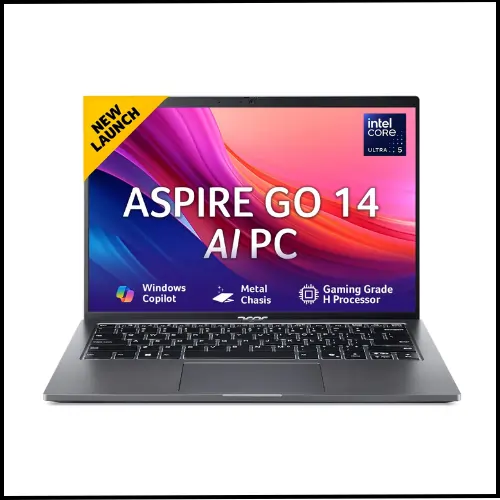
The Acer Aspire Go 14 AI-powered laptop is a new and smart choice, especially if you do daily tasks like coding, data analytics, digital marketing and Android development. It comes with the Intel Core Ultra 5 125H (14th Gen) processor, which is a fast and modern computing chip — this means this laptop will deliver fast multitasking and smooth performance.
This laptop comes with 16GB of DDR5 RAM and a 512GB SSD, which makes programs launch quickly and data files load quickly. The SSD storage also makes Windows 11 and MS Office faster. Working on large projects or opening multiple apps simultaneously will also be a breeze.
The 14-inch WUXGA IPS display screen will give you a clear and detailed view—reading code, working in Excel, and creating reports all feel effortless. The screen size and aspect ratio are eye-friendly, so you won’t tire your eyes quickly during long periods of reading or working.
This laptop also features AI support (Intel AI features), including Intel’s AI Boost/NPU capabilities. This means that some smart features like Windows Copilot’s shortcuts, content summaries, multitasking improvements, and battery optimisation can work a little faster and smarter.
This laptop is especially useful for AI-supported tools and everyday tasks, but it’s not meant for heavy AI training (like large deep-learning models).
The laptop’s design is sleek and lightweight (~1.5 kg), making it easy to carry, and the backlit keyboard makes typing at night a breeze. Windows 11 and MS Office come pre-installed.
Simply put, this laptop is a good choice for coding, data analysis, digital marketing, and regular college/office work. It’s fast, modern, and comes with AI-supported features, making your work a little smarter and smoother.
Specifications |
|
|---|---|
| Brand | Acer |
| Display Size | 14-inch |
| Screen Resolution | (1920 x 1080) Pixel |
| Screen Type | WUXGA IPS Display |
| Processor | Intel Core Ultra 5 125H |
| Processor Speed | 4.6 GHz (Boost Speed), 15 Cores |
| RAM Size | 16GB (Expandable up to 32GB) |
| Storage | 512GB NVMe SSD |
| Graphics | Integrated Intel ARC Graphics |
| Special Feature | Backlit Keyboard |
| OS | Windows 11 Home |
| Battery Life | 7 Hours |
| Weight | 1.7 Kg |
| Warranty | 1 Year |
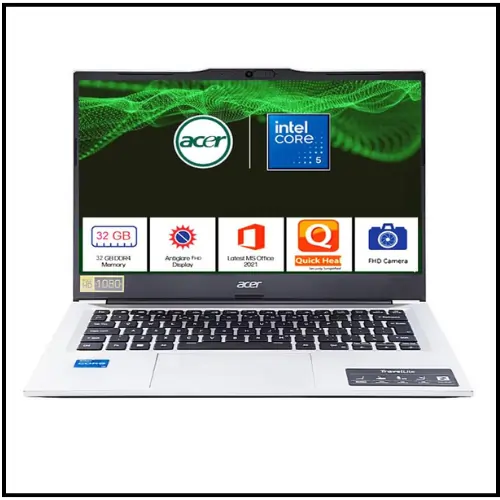
The Acer Professional 14 is one of the best laptops in the budget range, especially for users who want to do coding, AI learning, trading, data analytics, and professional work.
It’s powered by a 14th Gen Intel Core i5-120U processor, which ensures smooth high-level coding, data processing, and multitasking. Its 14-inch Full HD display provides a clear view for coding and analytics tools.
The premium metal body design of this laptop makes it sturdy and attractive; while weighing just 1.34 kg, it is quite lightweight and portable. Additionally, it comes pre-installed with Windows 11 Pro, MS Office 2021, and 12 months of antivirus, making it ready for both office and university work.
The most special feature of this laptop is its RAM and 3-year warranty because till now such high RAM, such a warranty and such powerful performance have been rarely seen in the budget category. This combination handles heavy multitasking, advanced coding and future-ready AI work with ease, making this laptop a great value for money and a smart choice for both professionals and students.
Specifications |
|
|---|---|
| Brand | Acer |
| Display Size | 14-inch |
| Screen Resolution | (1920 x 1080) Pixel |
| Screen Type | FHD Display |
| Processor | Intel Core i5-120U |
| Processor Speed | 5.0 GHz (Boost Speed) |
| RAM Size | 32GB |
| Storage | 512GB NVMe SSD |
| Graphics | Integrated Intel Iris Xe Graphics |
| Special Feature | Backlit Keyboard |
| OS | Windows 11 Pro |
| Battery Life | 6 Hours |
| Weight | 1.3 Kg |
| Warranty | 3 Year |
If you are a BCA student and want to buy a great laptop for yourself, then you can take a look at these laptops.
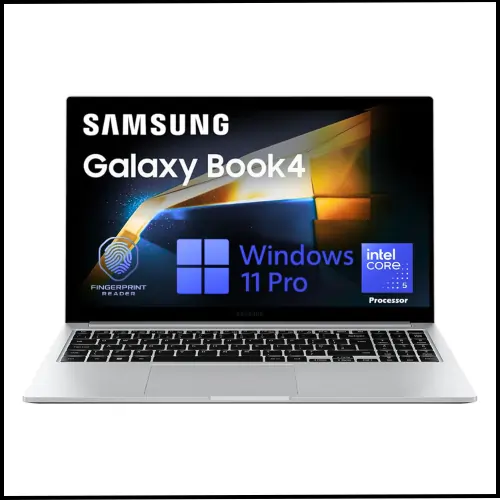
Samsung Galaxy Book4 is a powerful and reliable laptop, specially designed for coding, Trading, and data analytics professionals.
It comes with Intel’s 14th generation Core 5 120U processor, fast 512GB NVMe SSD storage and 16GB RAM, which makes coding languages like Python, Java, SQL and R and tools like VS Code, Jupyter Notebook, Power BI and Tableau run smoothly.
Its high-resolution, anti-glare display reduces eye strain even during long coding sessions. Along with its lightweight and slim design, good battery backup, and fast performance, it becomes a reliable and productive laptop in the budget range for students, software developers, and data analysts.
Specifications |
|
|---|---|
| Brand | Samsung |
| Display Size | 14-inch |
| Screen Resolution | (1920 x 1080) Pixel |
| Screen Type | FHD IPS Display, 300 nits |
| Processor | Intel Core i5-120U |
| Processor Speed | 5 GHz (Boost Speed) |
| RAM Size | 16GB |
| Storage | 512GB NVMe SSD |
| Graphics | Integrated Intel Iris Xe Graphics |
| Special Feature | Backlit Keyboard, Finger Print |
| OS | Windows 11 Pro |
| Battery Life | 8 Hours |
| Weight | 1.5 Kg |
| Warranty | 1 Year |
If you are looking to buy the best HP laptops under Rs 50,000, then you can take a look at these laptops.

The Lenovo ThinkBook 16 is a powerful and reliable laptop designed by Lenovo for both students and professional users. Its design is simple, but the aluminium top gives it a premium feel.
This laptop is powered by the AMD RYZEN 7 7735HS processor, which is a fast 8-core processor. This means coding in Java, C++, or Python; running multiple software simultaneously; opening browser tabs; or working in an IDE is a breeze.
Its biggest strengths are its 16GB of RAM and a 512GB SSD. The increased RAM prevents laptop lag and makes multitasking easier. The SSD also helps the operating system start quickly, and files and software load quickly. This setup is perfect for data analysis, basic data science and digital marketing tools like Excel, Power BI (basic), Google Ads and SEO tools.
Its 16-inch WUXGA IPS display is large and clear. More lines are visible simultaneously when typing code, reducing eye strain. The 300 nits of brightness is good for indoor use, and colours look good. The screen is quite comfortable for studying, projects and watching videos.
The keyboard is backlit, making it easy to type at night or in dim light. A fingerprint sensor is also available, making it quick and secure to unlock the laptop. These features are very useful in everyday use.
Battery life is average, neither too high nor too low. It should last between 3 and 5 hours under normal use. Heavy tasks, such as continuously running code or processing data, can drain the battery a little faster, but this is manageable with charging.
If you need a robust and future-proof laptop for coding, data analytics, digital marketing and programming (Java, C++, Python) in the ₹50,000 range, the Lenovo ThinkBook 16 is a value-for-money option.
Specifications |
|
|---|---|
| Brand | Asus |
| Display Size | 16-inch |
| Screen Resolution | (1920 x 1080) Pixel |
| Screen Type | WUXGA IPS FHD Display, 300 nits |
| Processor | AMD RYZEN 7 7735HS |
| Processor Speed | 4.7 GHz (Boost Speed), 8 Cores, 12 Threads |
| RAM Size | 16GB (Expandable up to 64GB) |
| Storage | 512GB NVMe SSD |
| Graphics | Integrated AMD Graphics |
| Special Feature | Backlit Keyboard, Finger Print |
| OS | Windows 11 Home |
| Battery Life | 5 Hours |
| Weight | 1.7 Kg |
| Warranty | 1 Year |

The ASUS Vivobook 15 (i5 14th Gen) is a thin and light-weight programming laptop, available on Amazon for under Rs 50,000. This laptop has a star rating of 4.0 out of 5 on Amazon and Flipkart. which Shows its popularity.
It has Intel’s Core 5 120U processor, 16 GB of RAM, and a 512 GB NVMe SSD. Running Windows 11 Home, this Asus laptop weighs only 1.7 kg and is capable of delivering solid coding and editing performance.
Apart from this, it has a chiclet keyboard with a num key, and its touch pad is quite thin, which works easily. This laptop can give 5 to 6 hours of battery backup, and it has MS Office pre-installed for office work.
This laptop will be suitable for those who want a laptop in this price range on which they can do normal video editing and play games along with coding.
Specifications |
|
|---|---|
| Brand | Asus |
| Display Size | 15.6-inch |
| Screen Resolution | (1920 x 1080) Pixel |
| Screen Type | Anti-glare FHD Display, 250 nits |
| Processor | Intel Core 5 120U |
| Processor Speed | 5.0 GHz (Boost Speed), 10 Cores, 12 Threads |
| RAM Size | 16GB (Expandable up to 64GB) |
| Storage | 512GB NVMe SSD |
| Graphics | Integrated Graphics |
| Special Feature | Backlit Keyboard, Finger Print |
| OS | Windows 11 Home |
| Battery Life | 7 Hours |
| Weight | 1.7 Kg |
| Warranty | 1 Year |
If you want to buy a best Programming laptop in the range of Rs 30,000, then you can look at these Coding laptops.
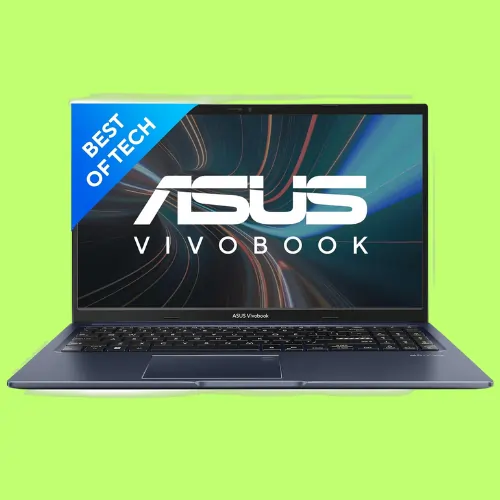
The Asus Vivobook 15 is considered one of the best coding laptops under ₹50,000 in 2026. It offers good performance, especially for programming and development, making it a perfect choice for both students and developers.
This laptop features the latest generation i5 processor and 16GB of DDR4 RAM, making multitasking a breeze. Working on large code projects and opening multiple software and browser tabs simultaneously is seamless.
Its 15.6-inch Full HD display is easy on the eyes. Even long coding sessions don’t cause eye strain, and the visual experience is quite good.
The Asus Vivobook 15’s design is lightweight and portable, making it easy to carry to college, the office, or anywhere else. This laptop comes pre-installed with MS Office, making it quick to start working on documents, presentations, and everyday office work.
Along with this, Microsoft 365 Basic (1 Year) and 100GB Cloud Storage are also provided, so that your files are saved securely in the cloud and you can access them from anywhere.
This laptop also has good battery backup, allowing you to work for long periods without needing to charge. Its modern keyboard is comfortable for typing, and it has all the necessary ports, making it a complete package.
Whether you are a student or an app developer, the Asus VivoBook 15 is capable of meeting your coding, programming and daily work needs with ease.
Specifications |
|
|---|---|
| Brand | Asus |
| Display Size | 15.6-inch |
| Screen Resolution | (1920 x 1080) Pixel |
| Screen Type | FHD AG Display, 250 nits |
| Processor | Intel Core i5-13420H |
| Processor Speed | 4.6 GHz (Boost Speed), 8 Cores, 12 Threads |
| RAM Size | 16GB (Expandable up to 24GB) |
| Storage | 512GB NVMe SSD |
| Graphics | Integrated Intel UHD Graphics |
| Special Feature | Backlit Keyboard, |
| OS | Windows 11 Home |
| Battery Life | 6 Hours |
| Weight | 1.7 Kg |
| Warranty | 1 Year |
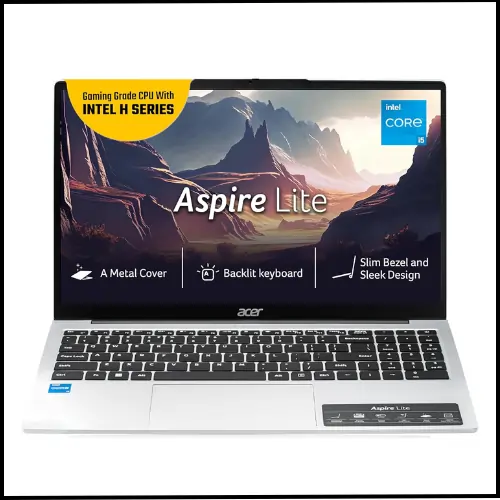
The Acer Aspire Lite (12th Gen Intel Core i5-12450H) is a good and balanced laptop for programming and coding under ₹50,000. Its powerful H-series processor helps run multiple programs simultaneously, making multitasking a breeze.
This laptop features an Intel Core i5-12450H processor, 16GB of RAM, and a 512GB SSD, which delivers smooth performance for coding, Python, Java, C++, web development, and basic editing. The SSD also helps the system boot quickly, and software loads quickly.
Its 15.6-inch Full HD display is comfortable for coding, reading, and viewing content. The backlit keyboard makes typing easy even in low light, a very useful feature for programmers.
The Acer Aspire Lite comes pre-installed with Windows 11 Home and MS Office, making it easy to get started right away. Its design is slim and lightweight (approximately 1.70 kg), making it easy to carry to college or the office.
Overall, the Acer Aspire Lite is a value-for-money laptop for both beginners and professional programmers, which can handle coding, daily work and basic editing well, and that too within a budget.
Specifications |
|
|---|---|
| Brand | Acer |
| Display Size | 15.6-inch |
| Screen Resolution | (1920 x 1080) Pixel |
| Screen Type | IPS Anti-Glare FHD Display, 250 nits |
| Processor | Intel Core i5-12450H |
| Processor Speed | 4.4 GHz (Boost Speed) |
| RAM Size | 16GB |
| Storage | 512GB NVMe SSD |
| Graphics | Integrated Intel UHD Graphics |
| Special Feature | Backlit Keyboard |
| OS | Windows 11 Home |
| Battery Life | 7 Hours |
| Weight | 1.7 Kg |
| Warranty | 1 Year |
If you want to buy a high-performance gaming laptop, then you can read this best gaming laptop post.
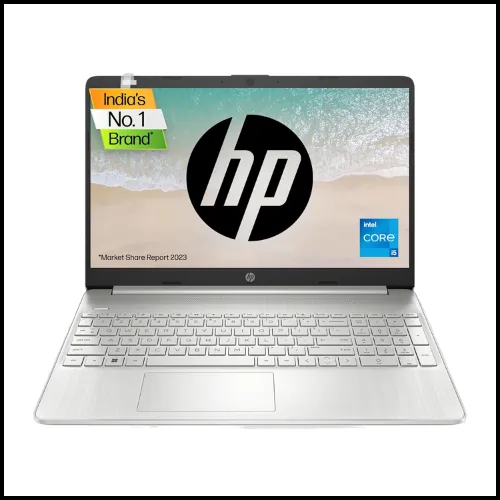
The HP 15s is a great laptop that comes with excellent performance, stylish design, and rich features, which is why it has the best user ratings. In this laptop, you will get Intel’s 12th generation Core i5 processor, which will complete all your work easily.
This laptop has 16GB of DDR4 RAM, which provides the ability to run multiple apps simultaneously and handle large projects. And it has 512GB of SSD storage, which provides faster data access and improves the working speed, and due to this, the performance of this laptop becomes excellent.
Apart from this, it has a 15.6-inch Full HD display, and its modern and stylish design makes it a lightweight and portable laptop, thus making it easy to carry and use anywhere.
This laptop is a perfect example of balanced performance and style, which fulfils all your needs and makes your work easy and effective. It is available in Best Laptops on Amazon and Flipkart under Rs 50000, making it a great choice for coding, trading, and editing.
Specifications |
|
|---|---|
| Brand | HP |
| Display Size | 15.6-inch |
| Screen Resolution | (1920 x 1080) Pixel |
| Screen Type | Anti-Glare FHD Display |
| Processor | Intel Core i5-1334U |
| Processor Speed | 4.6 GHz (Boost Speed), 10 Core, 12 Threads |
| RAM Size | 16GB |
| Storage | 512GB NVMe SSD |
| Graphics | Integrated Intel Iris Xe Graphics |
| Special Feature | Backlit Keyboard, |
| OS | Windows 11 Home |
| Battery Life | 7 Hours |
| Weight | 1.5 Kg |
| Warranty | 1 Year |
If you are looking to buy the best HP laptops under Rs 30,000, then you can take a look at these laptops.
If you want to buy a best gaming laptop in the range of Rs 60,000, then you can look at these gaming laptops.

The Lenovo IdeaPad Slim 3 (12th Gen Intel Core i5-12450H) is a good and reliable laptop for programming and coding under ₹50,000. It’s specifically designed for students and users who need strong performance.
This laptop features an Intel Core i5-12450H processor, a powerful H-series CPU. This makes coding, programming, Java, C++, Python, data analysis, IDEs, and multitasking run smoothly. Performance-wise, it’s considered quite strong in its segment.
16GB of RAM and a 512GB SSD make it even faster. Even when running multiple software, browser tabs, and coding tools simultaneously, the laptop doesn’t slow down. The SSD also makes Windows boot faster, and files and programmes open faster.
Its 15.6-inch Full HD anti-glare display boasts IPS-level quality, making colours look crisp and reducing eye strain. The screen is comfortable for long periods of coding, online classes, or viewing content.
The Lenovo IdeaPad Slim 3 comes pre-installed with Office Home 2024, making it quick to start working with Word, Excel, and PowerPoint. This feature is very useful for students and office users.
The laptop has a slim and professional design and weighs around 1.62 kg, making it easy to carry to college or work. The keyboard is comfortable, and the typing experience is good for coding, while the touchpad is also responsive.
Overall, the Lenovo IdeaPad Slim 3 is a great option for students who want to learn coding, programming, basic video editing, and daily tasks. If you don’t need a gaming laptop but do need a laptop with strong performance, it’s a great value-for-money choice.
Specifications |
|
|---|---|
| Brand | Lenovo |
| Display Size | 15.6-inch |
| Screen Resolution | (1920 x 1080) Pixel |
| Screen Type | IPS Anti-Glare FHD Display, 300 nits |
| Processor | Intel Core i5-12450H |
| Processor Speed | 4.4 GHz (Boost Speed), 8 Cores, 12 Threads |
| RAM Size | 16GB |
| Storage | 512GB NVMe SSD |
| Graphics | Integrated Intel UHD Graphics |
| Special Feature | Backlit Keyboard |
| OS | Windows 11 Home |
| Battery Life | 6 Hours |
| Weight | 1.6 Kg |
| Warranty | 1 Year |
These laptops not only fit comfortably within a ₹ 50,000 budget but also offer the necessary features and performance to support coding endeavours.
Keep in mind that the prices of gaming laptops can fluctuate over time. Therefore, it’s advisable to select your desired laptop from this list at your earliest convenience.
Tips for Optimising Your Coding Laptop
Regular Maintenance
To keep your coding laptop running smoothly, perform regular maintenance tasks such as updating your operating system, cleaning dust from the vents, and managing your software installations.
Cooling Solutions
Coding can be CPU-intensive, leading to heat buildup. Consider using a cooling pad or an external fan to prevent overheating and ensure consistent performance.
External Accessories
Invest in external accessories like a high-quality monitor, keyboard, and mouse for a more comfortable and efficient coding setup.
If your budget is less than Rs 30k, then you can look at these Lenovo laptops.
Frequently Asked Questions
If you are a CA student and want to buy a great laptop for yourself, then you can take a look at these laptops.
Conclusion
When it comes to finding the best coding laptop under 50,000 rupees, the Acer Aspire Go 14, Acer Professional 14, Samsung Galaxy Book4, Lenovo ThinkBook 16, ASUS Vivobook 15 (i5 14th Gen), Asus VivoBook 15, Acer Aspire Lite, HP 15 i5 13th Generation and Lenovo IdeaPad Slim 3 stand out as reliable options. These laptops offer a perfect balance between performance, features, and affordability, ensuring a seamless coding experience for programmers on a budget.
Whether you’re a beginner or an intermediate coder, these laptops will empower you to embark on your programming journey.
I hope you liked this list of the 9 best coding laptops under 50k INR. If you have any questions related to this post, comment below and share this blog post with your friends. So that they can also get help in choosing a laptop for themselves in this budget range for coding.
If you want to get a budget-friendly laptop, then you can look at these laptops.

My name is Sonu Kumar, and I update new posts related to the best laptops and digital marketing on this website every day. I hope you liked the post written by me.
nice article